Google Sheets Template
CollectLane
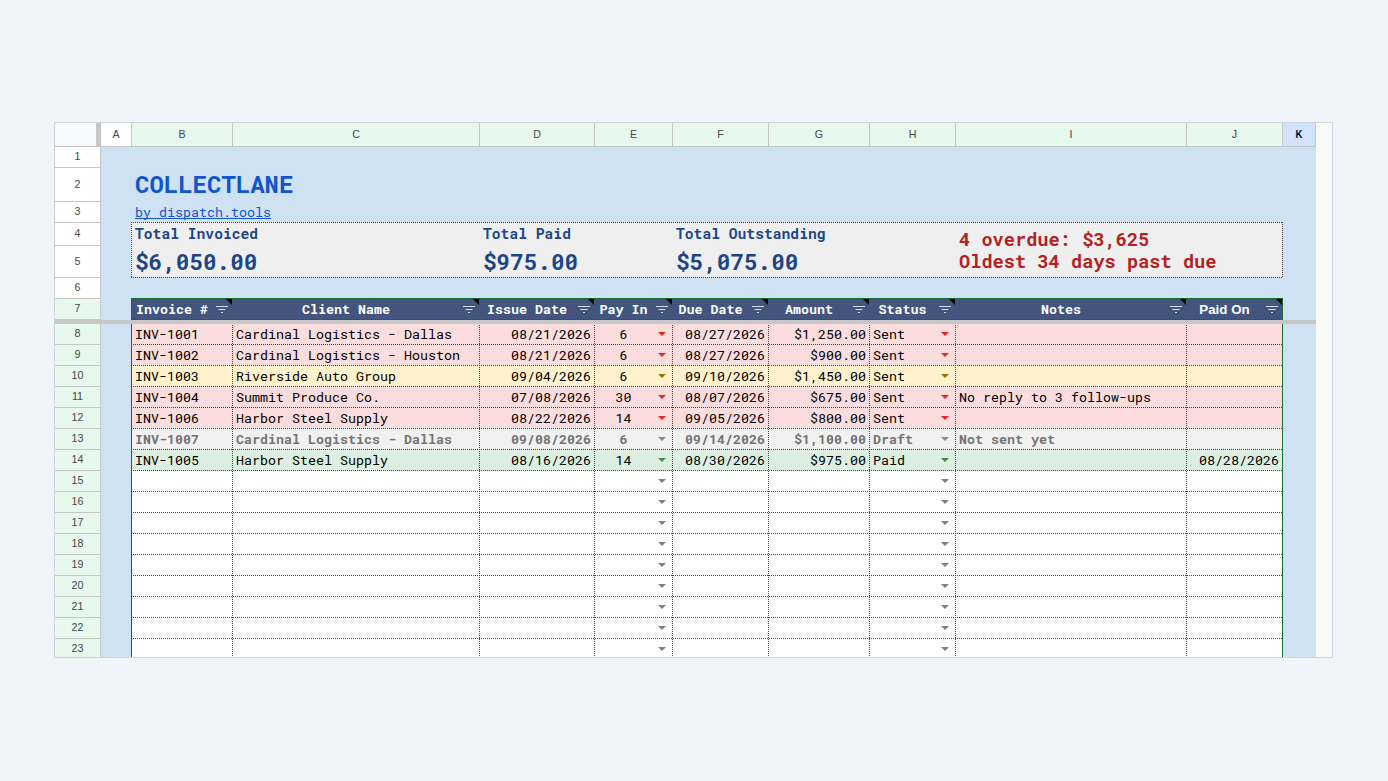
Keep your invoices in one Google Sheet. Every morning CollectLane emails you the ones that are due today or past due, grouped by who actually pays, with a Gmail search link for each invoice number. It never emails your customers.
Made for freight billing: carriers invoicing brokers, brokers invoicing shippers and dealers, owner operators and dispatchers — car hauling, flatbed, reefer and dry van.
Daily email of what's overdue
Sent to you, never your customers
Due dates from each customer's terms
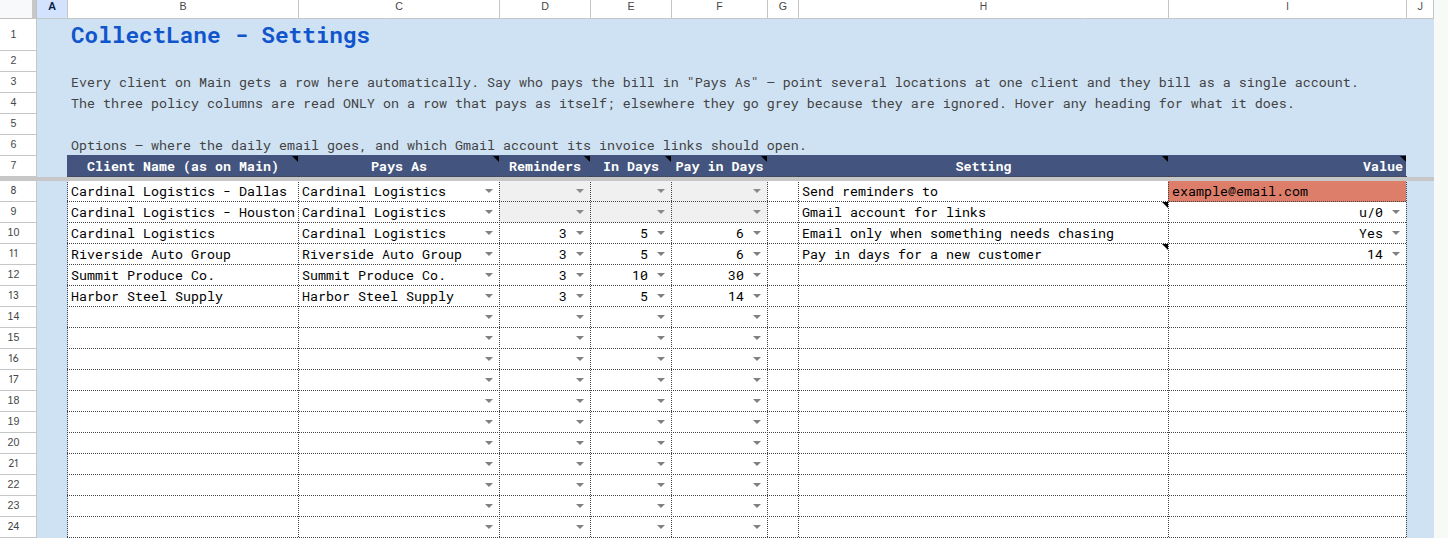
Several locations, one account
Follow-up schedule per customer
Your own copy, no subscription
$10One-time purchase · licence for one business
Buy for $10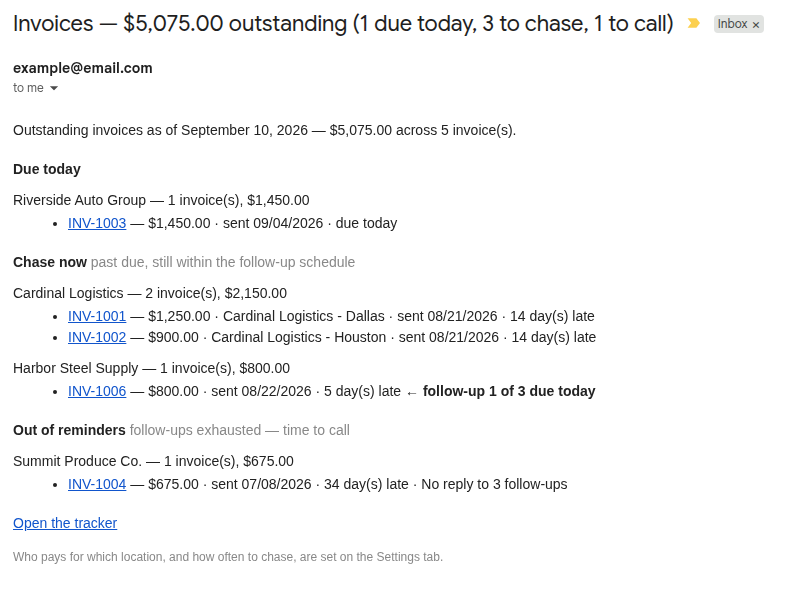
Questions
Will it email my customers?
No, and it cannot. CollectLane only ever emails the one address you put on the Settings tab, which is meant to be your own. Nothing is sent on your behalf and no customer is ever contacted, so a status you forgot to update costs you thirty seconds rather than a relationship.
Does it create or print invoices?
No. CollectLane is a tracker, not a generator. You keep making invoices however you do now. This is the part that comes after: knowing who has not paid, and being reminded without having to remember.
If you make invoices from ProABD orders, InvoiceLane builds them, and with an InvoiceLane licence it copies each one into CollectLane in one click.
Is there anything to install, or a monthly fee?
Neither. It is a Google Sheet. You make your own copy into your own Google Drive, and it is yours from then on. There is no subscription, no add-on to install and nothing running on our servers. You need a free Google account and nothing else.
Google says the app “hasn’t been verified”. Is that safe?
That notice appears because the script lives inside your own copy of the sheet rather than in a published add-on, which is normal for a Google Sheets template. The code is in your copy where you can read it, it runs under your own Google account, and the only thing it does with permission to send mail is send the daily list to the address you chose. Tick “Select all” and continue — the daily email cannot work without those permissions.
My customers pay on different terms. Does that work?
Yes. Payment terms are set per customer, so one dealer on seven days and another on net 30 both come out right, and the due date on each invoice is worked out from the terms of whoever is paying it. You can also override the terms on a single invoice when one job is different.
I bill several locations that all pay through one company.
That case is the reason the Settings tab exists. Point as many locations as you like at the client who actually pays, and the daily email groups everything under that one account — so you chase the company once instead of chasing four of its yards separately.
I am not in freight. Will it still work?
Yes. Nothing in it is specific to trucking — it tracks invoices, due dates and who owes you. The wording and the sample data are freight because that is who it was built for, and you replace the sample data with your own anyway.
What happens to my copy if you stop selling it?
Nothing. Your copy lives in your Google Drive and runs entirely inside your own Google account, with no licence check and no connection back to us. If this site disappeared tomorrow your sheet would keep emailing you the following morning.
Anything not answered here, get in touch.