When a carrier calls to book your load, one document protects you more than any other: a current certificate of insurance with your company listed as the certificate holder.
This is the routine we use for every booking. It takes about a minute, and it ends with a file named so that the next time that carrier calls, one search tells you their cargo limit, when it expires and whether they have renewed on time — without opening anything.
What you need from every carrier
- A current certificate of insurance (often called a COI).
- Your company listed as the certificate holder on it.
One thing to be clear about: being the certificate holder is not coverage. The certificate says so itself — it "confers no rights upon the certificate holder". What it does give you is proof, issued to you on the day you asked, that the policies existed when you booked, and it means the carrier's agent has your details on file.
It matters more than it sounds. Federal rules only require a cargo insurance filing from household goods movers, so for a car hauler, a flatbed or a dry van carrier, the certificate is usually the only place you will ever see their cargo coverage.
Ask by text, not by phone
If the carrier calls you, tell them what you need, then send the request as a text message. There are three reasons:
- You have proof of who asked for what, and when.
- Nothing gets misheard. Your email address and company details arrive spelled correctly.
- You never retype it. The message is the same for every carrier, so you save it once.
The message to send
Save this once, with your own details filled in:
To book this load, we need a certificate of insurance with our company added as the certificate holder.
It must be sent directly by your insurance agent to: insurance@yourcompany.com

Certificate holder:
Your Company Name LLC
123 Main St, City, ST 00000
Keep it somewhere you can copy it from, or use a text expander so a short code types the whole message for you: Beeftext is a free app for Windows, and Text Blaze is a Chrome extension. We will cover text expanders properly in a separate post.
Only accept a certificate from the agent
Look at the message again: the certificate has to be sent by the insurance agent, straight to you. Never accept one that the carrier forwards from their own email, and never one from a Gmail address.
A forwarded certificate can be out of date, edited, or someone else's. When it comes from the agency or from an insurance platform directly, the sender should match the agency named in the Producer box. If anything looks off, look up the agency's phone number yourself and call to confirm — don't use a number printed on the certificate you are trying to verify.
Five things to check before you book
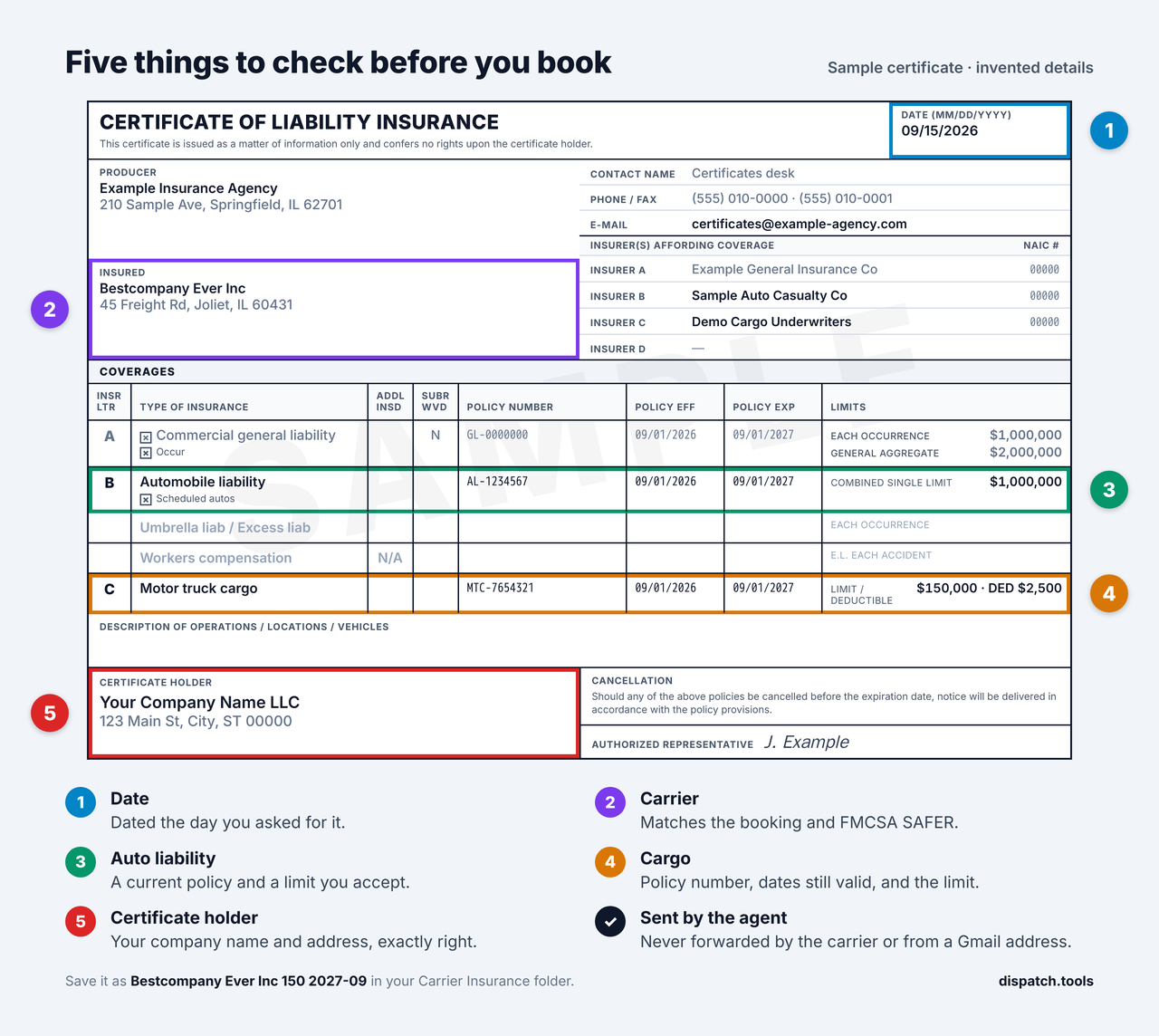
- The date. The certificate date, top right, should be the day you asked for it. That date is your evidence that the agent really processed your request and put your company in the holder box today — rather than someone finding an old PDF, typing your details into it and sending it on. A recycled certificate usually still carries the date it was genuinely issued, which makes this the cheapest check on the page. If you requested it today, it has to be dated today.
- The carrier. The insured's name and address must match the carrier booking your load on the load board or platform. Look their MC or DOT number up on FMCSA's SAFER company snapshot and make sure the name matches and the authority is active.
- Auto liability. There is a policy with a limit and current dates. The federal minimum for most for-hire freight trucks is $750,000 (49 CFR 387.9); check it meets your own requirement.
- Cargo. There is a policy number, an effective date, an expiration date that is still in the future on the day the load delivers — not merely today — and a cargo limit — usually $150K, $250K, $350K or $500K. Compare that limit to what is going on the truck. The cargo limit applies to the whole load, not to each car, so nine vehicles at $40,000 each is $360,000 riding on a policy that may only cover $150,000 of it.
- The certificate holder. Your company's name and address are exactly right.
If all five pass, the paperwork is right. One more look tells you whether the trucks match it.
Check the inspections against the certificate
A certificate tells you what the policy says. Roadside inspections tell you what the carrier is actually running. The SAFER company snapshot you already opened shows the power units the carrier reported, the number of inspections in the last two years and how often those ended in an out-of-service order. FMCSA's SMS site lists each inspection, the vehicles inspected and the violations found.
- More trucks on the road than on the policy. If the certificate lists the carrier's vehicles, compare them with the units turning up in inspections. One or two extra is normal. Several trucks or trailers that are not on the certificate is not — a vehicle that is not on the policy may not be covered, and you will not know which truck shows up for your load. Ask the agent, or use a different carrier.
- What put them out of service. SAFER prints the national average next to the carrier's vehicle out-of-service rate. A rate well above it, or the same brake, tire or light violations again and again, tells you how the equipment is looked after. A truck that fails inspection on the way stops your car with it.
Neither check needs a phone call, and both take less than a minute once SAFER is open.
If a check fails, use a different carrier
Not later — this load. Ask the agent to send a corrected certificate, and book the carrier the next time they call, once it is in your folder and it is right.
That is stricter than it sounds, and it is deliberate. Double brokering and carriers operating under a real company's stolen identity have been a serious problem on the load boards for years now, and the certificate is one of the documents that gets faked. Turning a carrier down costs you a phone call to the next one. Getting it wrong costs you somebody's car.
Four cases worth naming:
- The policy runs out during the haul. The cargo policy expires in two days and the car delivers in four. Every date on the certificate is current, and the last two days of the trip are uninsured. Ask them to renew and send a new certificate.
- The cargo limit is short. Nine cars at $40,000 against a $150K policy is not a paperwork problem to argue about. It is the wrong truck for that load.
- The insured's name is not quite the carrier's name. A near-match is exactly what a reused identity looks like. Stop, and check the MC or DOT number on FMCSA SAFER before anything else.
- The date is not today's. If you asked for it this morning and it is dated last month, the agent did not issue it for you. Treat it as no certificate at all.
You will find another truck. That is a smaller problem than the one you just avoided.
Name the file so you never have to open it
This is the part that saves the most time later. Save every certificate with one pattern:
carrier name + cargo limit in thousands + cargo expiry as year-month
Bestcompany Ever Inc 150 2027-09
- Bestcompany Ever Inc is the carrier's name. Copy it from the certificate if you can; if the PDF will not let you, copy it from their text message or from the load board.
- 150 is a $150K cargo limit.
- 2027-09 means the cargo policy expires in September 2027.
Write the expiry year first, even though it looks backwards next to the MM/DD/YYYY dates printed on the certificate itself. "09 27" can be read as the 27th of September, while "2027-09" can only mean one thing — and because the year leads, the folder sorts in order of expiry instead of clumping every March together regardless of the year.
Keep them in one folder and search it
Save every certificate in one Google Drive folder, for example Carrier Insurance.
The next time a carrier calls to book, type their name into the Drive search. If you already have their certificate, the file name tells you the cargo limit and the expiry date right there in the results, without opening anything. If the date has passed, or you have nothing for them, send the saved message and start again.
Keep the old ones
When a carrier sends a new certificate, do not delete the one you already have. Replacing it feels tidy, but the old certificates are what turn the folder into a record.
Because every file starts with the carrier's name, searching that name brings back their whole history at once:
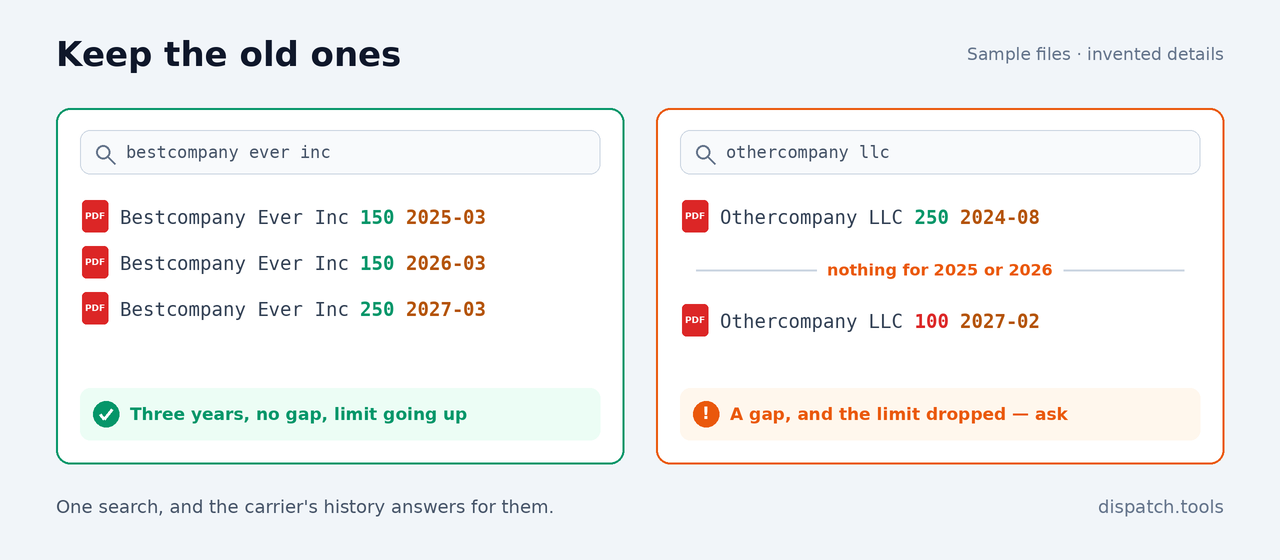
Three certificates, three years running, and a limit that went up rather than down. Nobody had to tell you that this carrier renews on time — the search results said it, and you never opened a file.
The same view shows you the opposite just as quickly. A missing year does not prove a carrier was uninsured — only that you never saw a certificate for it — and a limit that fell from $250K to $100K usually means something changed at their end. Neither is a reason to refuse a load on its own. Both are worth a question before you book.
The routine, start to finish
- Send your saved text message.
- Accept the certificate only from the agent.
- Check the date, the carrier, auto liability, cargo and the certificate holder. If any of them fails, use a different carrier for this load.
- Compare the carrier's inspections with the certificate: units on the road that are not on the policy, and what put them out of service.
- Name it
Carrier Name 150 2027-09. - Save it to your Carrier Insurance folder, keeping the older ones, and search there before every booking.
After the load delivers
Once the load is delivered, the paperwork moves on to the invoice. If you work in ProABD, InvoiceLane builds the invoice from the order page in one click, and CollectLane keeps track of which invoices are still unpaid and emails you every morning with the ones to chase.
This is the routine we use, not legal or insurance advice. Your contracts, and your own insurance, may ask for more.